Ergonomic Office Chairs: Features That Support Your Back
Many office workers spend a significant portion of their day seated. This prolonged sitting can place stress on the back and lead to discomfort. Understanding the features that make an office chair ergonomic can help individuals make informed decisions about their workspace setup. Ergonomic chairs are designed to accommodate the natural curves of the spine and promote healthy posture.
Key features such as adjustable lumbar support, seat depth, and armrests play a crucial role in reducing strain on the back. These adjustments allow the chair to fit the user’s body rather than forcing the body to adapt to the chair. When properly configured, an ergonomic chair can support the user through long work hours, though individual experiences vary based on factors like body type, sitting habits, and overall health.
This article explores the essential ergonomic features of office chairs that contribute to back support. It examines how each component functions and why it matters for comfort and potential strain reduction. The goal is to provide a clear understanding of what to look for when selecting a chair, without making definitive claims about health outcomes.
The Importance of Adjustable Lumbar Support
Lumbar support refers to the part of the chair that supports the lower back, also known as the lumbar region. The spine has a natural inward curve in this area, and maintaining that curve while sitting can help reduce pressure on the discs and muscles. Without proper support, the lower back may flatten or round, leading to increased strain over time. Adjustable lumbar support allows users to customize the height and depth of the support to match their spine’s natural curve.
Height adjustment enables the lumbar support to be positioned at the correct level for the user’s body. The ideal position is typically in the small of the back, just above the belt line. Depth adjustment controls how far the support protrudes, which can be increased for more pronounced curves or decreased for less. Some chairs also offer firmness adjustments, allowing users to fine-tune the pressure. These adjustments are essential because body shapes and sizes vary significantly.
Research in ergonomics suggests that proper lumbar support can help maintain the spine’s natural alignment, potentially reducing muscle fatigue and discomfort. However, the effectiveness depends on correct adjustment and consistent use. It is also important to note that lumbar support is just one factor among many that contribute to overall comfort. Individuals with specific back conditions should consult a healthcare professional for personalized advice.
When considering an ergonomic chair, look for lumbar support that is easily adjustable without requiring tools. The mechanism should be intuitive and allow for quick changes as posture shifts throughout the day. Urban Loft offers chairs with such features, but the focus should remain on finding a chair that fits your individual needs. The key is to experiment with different settings to find what feels most supportive for your back.
Seat Depth and Its Role in Back Support
Seat depth is the distance from the front edge of the seat to the backrest. Proper seat depth ensures that the user can sit with their back against the backrest while leaving a small gap (about two to three fingers wide) between the back of the knees and the seat edge. If the seat is too deep, the user may slide forward to avoid pressure behind the knees, which can cause the back to lose contact with the backrest and lead to slouching. If the seat is too shallow, it may not provide adequate thigh support, increasing pressure on the sit bones.
Adjustable seat depth, often achieved through a sliding seat mechanism, allows users to modify the depth to suit their leg length. This is particularly important for people of different heights. For example, a taller person may need a deeper seat to support their thighs, while a shorter person may need a shallower seat to allow their back to reach the backrest. Without adjustment, a fixed seat depth may work for some but not for others.
When seat depth is correctly set, it promotes a neutral pelvis position and supports the natural curve of the spine. This can help distribute weight evenly across the seat and reduce pressure points. It also encourages the user to sit back and rely on the backrest for support rather than perching on the edge of the chair. Over time, this can contribute to better posture and reduced strain on the back.
In addition to depth, the angle of the seat pan can also affect comfort. Some ergonomic chairs allow the seat to tilt slightly forward or backward, which can change the pressure distribution. However, seat depth remains a fundamental adjustment. When evaluating an office chair, test the seat depth adjustment to ensure it locks securely and moves smoothly. Remember that seat depth should be adjusted after setting the chair height, as these two adjustments interact.
Armrests: Reducing Strain on Shoulders and Back
Armrests may seem like a minor feature, but they play a significant role in reducing strain on the shoulders, neck, and back. When armrests are properly positioned, they support the weight of the arms, which can reduce the load on the shoulders and upper back. This is especially beneficial during tasks that involve typing or mousing, as it allows the shoulders to relax rather than being held up by muscle tension. Without armrests, the arms may hang unsupported, leading to fatigue and potential discomfort.
Adjustable armrests are essential because they can be tailored to the user’s body and the task at hand. Key adjustments include height, width, and depth. Height adjustment allows the armrests to be set so that the elbows are at approximately a 90-degree angle when the arms are resting, which helps maintain neutral shoulder position. Width adjustment ensures that the armrests do not force the shoulders into an elevated or rounded position. Depth adjustment allows the armrests to be moved forward or backward to support the forearms without interfering with the chair’s backrest or the desk.
Some armrests also offer angle adjustment, which can be useful for different activities. For example, when typing, the armrests might be angled slightly inward to support the forearms, while during a phone call, they might be adjusted to support the elbows. The goal is to provide support without creating pressure points or restricting movement. It is important to note that armrests should not be so high that they push the shoulders up, nor so low that the user has to lean to one side to use them.
When armrests are correctly adjusted, they can help maintain a relaxed posture and reduce the need for frequent position changes. However, they are not a substitute for proper lumbar support and seat depth. All components work together to create an ergonomic seating experience. Individuals should adjust armrests after setting the chair height and lumbar support to ensure harmonious alignment.
Additional Features and Considerations
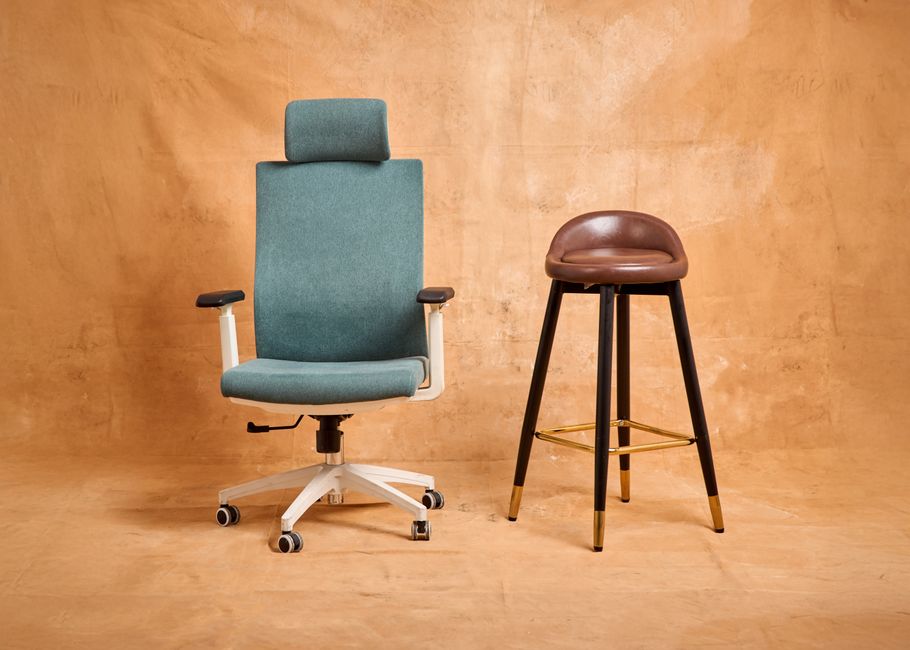
Beyond lumbar support, seat depth, and armrests, several other features contribute to an ergonomic office chair. Seat height adjustment is fundamental, allowing the user to set the chair so that their feet are flat on the floor and their thighs are parallel to the ground. A synchronized tilt mechanism lets the backrest and seat move together, promoting circulation and allowing for gentle recline. A breathable backrest material can help regulate temperature, while a padded seat can enhance comfort. Headrests may provide support for the neck during recline, but they are optional and depend on personal preference.
When selecting an ergonomic chair, consider the adjustability range of each feature. A chair that offers a wide range of adjustments can accommodate more body types and sitting preferences. Also, look for sturdy construction and quality materials, as these affect durability and long-term performance. The ability to lock adjustments in place is important to prevent unintended changes during use. Some chairs come with a warranty, which can be a indicator of the manufacturer’s confidence in their product. Urban Loft provides a variety of ergonomic chairs, but the decision should be based on individual needs and preferences.
It is also worth noting that no chair can completely eliminate the risks associated with prolonged sitting. Ergonomics is about reducing strain and promoting movement. Taking regular breaks to stand, stretch, and walk is essential, regardless of the chair’s features. Combining an ergonomic chair with good work habits, such as maintaining an ideal monitor height and keyboard position, can further support back health. Individuals with existing back pain should seek advice from a healthcare professional before making significant changes to their seating.
In conclusion, ergonomic office chairs offer a range of features designed to support the back during long work hours. Adjustable lumbar support, seat depth, and armrests are among the most important, as they allow the chair to conform to the user’s body. When properly adjusted, these features can help maintain neutral posture and reduce strain. However, the effectiveness depends on correct setup and consistent use, as well as other factors like overall health and work habits. By understanding these features, individuals can make informed choices to create a more comfortable and supportive workspace.